Casino
  Live Casino
  Sports
  Search
  Profile
FortunePlay App for Android and iOS (PWA)
The FortunePlay Casino app operates as a Progressive Web App (PWA), providing direct access to pokies, tables and live games without draining device storage. By installing the PWA, Australian players get a chance to claim a welcome package of up to A$5,000 and 300 free spins. Another great benefit of FortunePlay app is instant push notifications for current tournaments, such as Apple Kingdom with an A$300,000 prize pool and real-time bonus updates.

How to Use the FortunePlay Application?
The FortunePlay Casino app version requires no traditional download from the Google Play Store or App Store. It runs directly through your mobile web browser while functioning like a native APK.
- Navigation: Use the main menu at the bottom to switch between the Casino and Live Casino.
- Game Access: Tap any pokie, table game or live dealer stream to launch it instantly in full-screen mobile mode.
- Notifications: Agree to the browser prompt to receive real-time alerts regarding current tournaments and promos from the FortunePlay app.
- Account Management: Tap the profile icon at the top of the screen to check your balance, make deposits, request withdrawals or track active bonuses.
How to Use and Install FortunePlay on Android?
Since the FortunePlay app is a PWA, you do not need to visit official stores. It installs through your mobile browser (such as Google Chrome).
- Open the Website: Launch your preferred mobile browser and go to the official site.
- Locate the Download Prompt: Tap the “Download App” link in the sidebar menu or scan the QR code displayed on the desktop site using your phone’s camera.
- Add to Home Screen: A prompt will be at the bottom or top of your screen at FortunePlay Casino app, and then you click “Add to Home Screen” or “Install App”.
- Confirm Installation: Confirm the action when prompted by your browser.
- Use the APK: A shortcut icon with the logo will appear on your Android home screen. Tap the icon to launch the APK instantly, log into your account and start playing.
How to Install FortunePlay App on iOS?
The FortunePlay app installs directly onto iPhones and iPads via the native Safari browser without using the Apple Store.
- Open Safari: Launch the Safari browser on your iOS device and visit the official website.
- Scan or Navigate: Scan the QR code from a desktop screen using your iPhone camera or navigate to the site directly on your phone.
- Open the Share Menu: Tap the “Share” button (the square icon with an upward arrow) located at the bottom of the Safari browser screen.
- Add to Home Screen: Scroll down the list of options and select “Add to Home Screen”.
- Confirm: Name the shortcut “FortunePlay app” and tap “Add” in the top-right corner.
The icon will now appear on your iOS home screen alongside your regular apps so you’ll be able to tap it to open the casino instantly in full-screen mode, bypassing the standard browser address bar.
Available Device Types
FortunePlay Casino app does not require specific hardware configurations, high-end processors or large amounts of free internal storage. Australians players can use these devices:
- Android: Smartphones and tablets running Android OS 5.0 or higher.
- iOS: iPhones and iPads running iOS 12.0 or higher.
- Desktop: Windows and macOS laptops and personal computers.
The app functions on all major web browsers, including Google Chrome, Safari, Mozilla Firefox, Microsoft Edge and Opera Mobile.
Interface of FortunePlay Mobile App
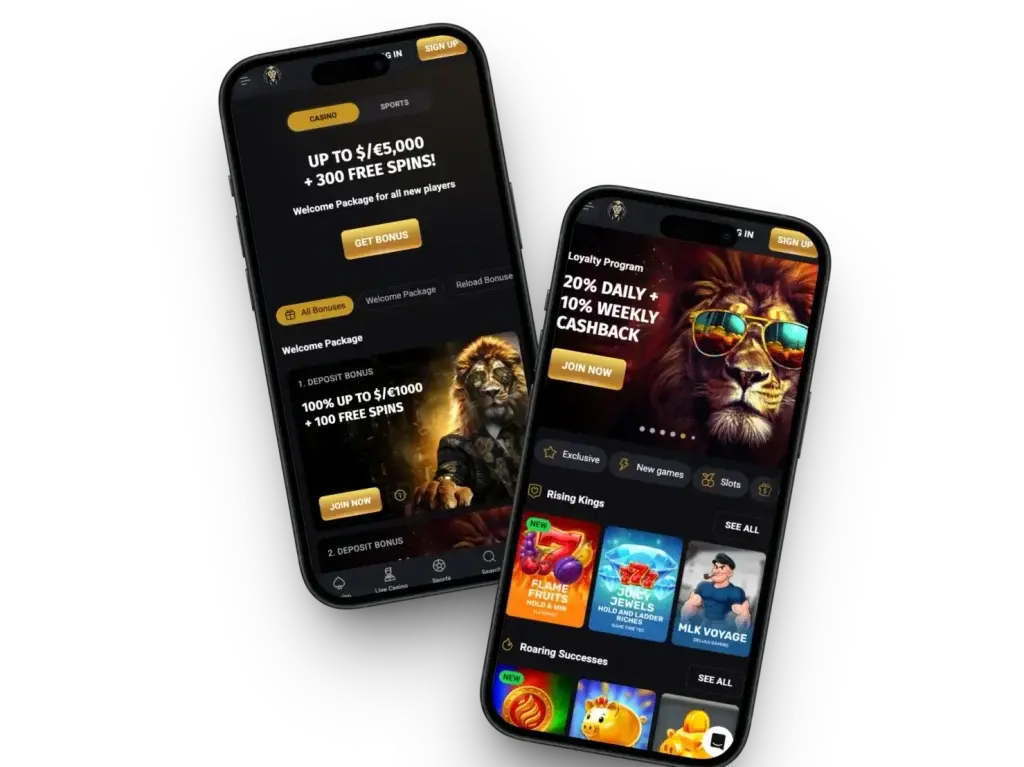
The FortunePlay Casino app features a dark-themed, compact user interface designed for one-handed navigation on mobile screens and a clean layout on desktop devices. The main menu is located at the bottom of the screen and provides direct links to Casino, Live Casino, Promotions, Search and Profile. Right in the middle, you will see the golden “LOG IN” and “SIGN UP” buttons. Games are conveniently displayed with three games per row; their names and providers are clearly visible, so you don’t need to open each title particularly.
Account Registration and Deposit
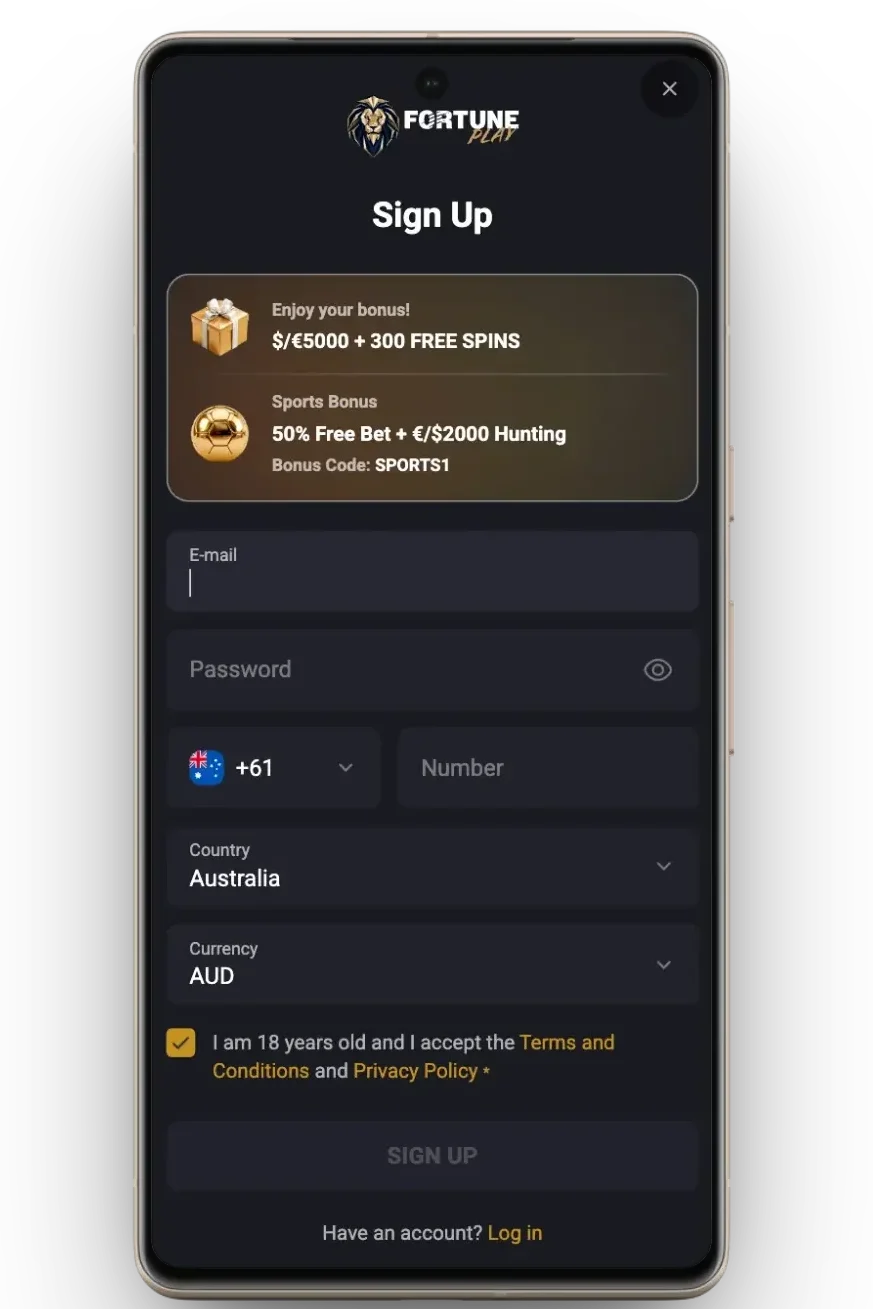
FortunePlay app players can easily create an account and fund it directly through the mobile interface. Every Australian player who is older than 18 years can do it by:
- Open the APK: Launch the PWA from your device home screen.
- Tap Sign Up: Select the golden “SIGN UP” or “LOG IN” button displayed on the screen.
- Enter Details: Fill in the registration form with your email address, password, currency choice, country and phone number.
- Confirm: Accept the terms and conditions and tap to finalise profile creation.
- Access the Wallet: Go to your Profile or tap the deposit section in the app.
- Select Payment Method: Choose from the available options displayed in the interface, including Visa, Mastercard, Skrill or Neteller.
- Enter Amount: Input your desired top-up amount, ensuring it meets the minimum requirement for the welcome reward.
- Authorise: Confirm the transfer to instantly credit funds to your balance via mobile app.
Benefits of Using the App
Using the mobile app version offers several technical and operational advantages over traditional APKs and standard desktop browsing:
- Zero Storage Overhead: Since it is a PWA, it operates directly through browser engines and saves internal storage space on your device.
- Instant Loading Speeds: The app caches essential visual elements locally so you get lightning-fast transitions between casino sections and faster game loading times.
- One-Tap Access: Removes the need to open a browser and type the URL; a shortcut on your home screen launches the casino instantly in full-screen mode.
- Optimised Mobile Layout: The FortunePlay app interface scales to fit any of your screen dimensions, placing key navigation items within easy thumb reach at the bottom of the screen.
- Push Notifications: Keeps you updated instantly on new casino tournaments, game releases and personalised loyalty rewards.
Bonuses for Mobile App Players
FortunePlay Casino app players can access the complete promotional catalog directly through the mobile interface. Wagering requirements range between 30x and 40x and the minimum deposit is usually A$20. Additionally, there are exclusive offers for mobile users when they install the APK. Check out the table below to see all the main rewards you can get.
| Promo Type at app | Value | Code |
|---|---|---|
| 1st Deposit Bonus | 100% up to A$1,000 + 100 FS | FORTUNE1 |
| 2nd Deposit Bonus | 50% up to A$1,000 + 50 FS | FORTUNE2 |
| 3rd Deposit Bonus | 50% up to A$1,500 + 50 FS | FORTUNE3 |
| 4th Deposit Bonus | 75% up to A$1,500 + 100 FS | FORTUNE4 |
| VIP Welcome Bonus | VIP Club Eligibility | VIP |
| Turbo Reload Tuesdays | 100% bonus up to A$1,500 + 100 FS | TUE |
| Turbo Reload Sundays | 100% bonus up to A$1,500 | SUN |
| Leo Season Prize Wheel | Daily Prize (Free Spins or Cash) | N/A (Free to Play) |
| Lucky Spin | Up to A$10,000 | N/A |
Security and Data Protection
Fortune Play online mobile casino runs directly through verified web browsers and combines native mobile protections with enterprise-grade platform security. These are the security measures:
- SSL Encryption: All communication, personal details and financial transactions are fully encrypted using high-grade 256-bit Secure Sockets Layer protocols.
- Browser Sandboxing: The PWA runs exclusively within your browser’s secure container, meaning it cannot access your device’s private file system, contacts or local storage.
- Regulatory Compliance: The FortunePlay mobile app operates under an official gaming licence (OGL/2024/161/0191), guaranteeing audited game fairness and adherence to strict financial standards.
- Identity Verification: Strict KYC procedures are built into the mobile interface to prevent identity theft, underage access and fraudulent account behaviour.